What Is Google AdSense? How It Works, Revenue Sharing, and Getting Started
Google AdSense lets website and blog owners display ads alongside their content and receive a share of the advertising revenue. The publisher supplies the content and ad space, while Google connects advertising demand and handles ad delivery and settlement. Creating an account does not immediately enable ads: site review, policy compliance, and ad and payment settings are separate requirements.
What is Google AdSense?
Ads can appear between paragraphs or near the edges of a blog page. AdSense helps the people who operate these sites earn revenue from their ad space. In this context, a publisher is a person or business that publishes content and operates a site. Joining AdSense is free, although domain names, hosting, and content production can still involve costs. See Google's explanation of how AdSense works for the underlying model.
This guide focuses on AdSense for Content for ordinary websites and blogs. YouTube monetization involves the YouTube Partner Program and AdSense for YouTube; a blog's site approval should not be confused with YouTube's requirements.
Google Ads serves a different purpose. Advertisers use Google Ads to spend money promoting products or services. Site owners use AdSense to earn revenue by displaying ads. Both belong to Google's advertising ecosystem, but they serve different participants. Understanding the difference between AdSense and Google Ads helps you choose the appropriate service.
| Monetization method | What the publisher does | What revenue depends on |
|---|---|---|
| AdSense | Provides ad space and operates the site in compliance with policies. | Ad impressions and auction results for AdSense for Content. |
| Affiliate marketing | Recommends products or services through trackable affiliate links. | Purchases, registrations, or other results defined by the affiliate program. |
| Direct sponsorship or advertising | Negotiates content production or ad placement directly with an advertiser. | Agreed production fees, placement fees, or performance terms. |
For example, displaying an AdSense ad on a travel-planning article differs from receiving a commission when someone books through a hotel affiliate link. If you combine methods, readers must still be able to distinguish advertising from editorial content. Check the disclosure obligations and policies for each arrangement.
How are ads displayed and revenue generated?
The basic sequence is make ad space available → auction and display ads → calculate and settle revenue. Once the necessary code is installed, the site can send ad requests. Google's systems select ads using information about the content and visitors, along with ad settings and other factors. You do not have to sell every placement to an advertiser or manually choose an ad for each visit.
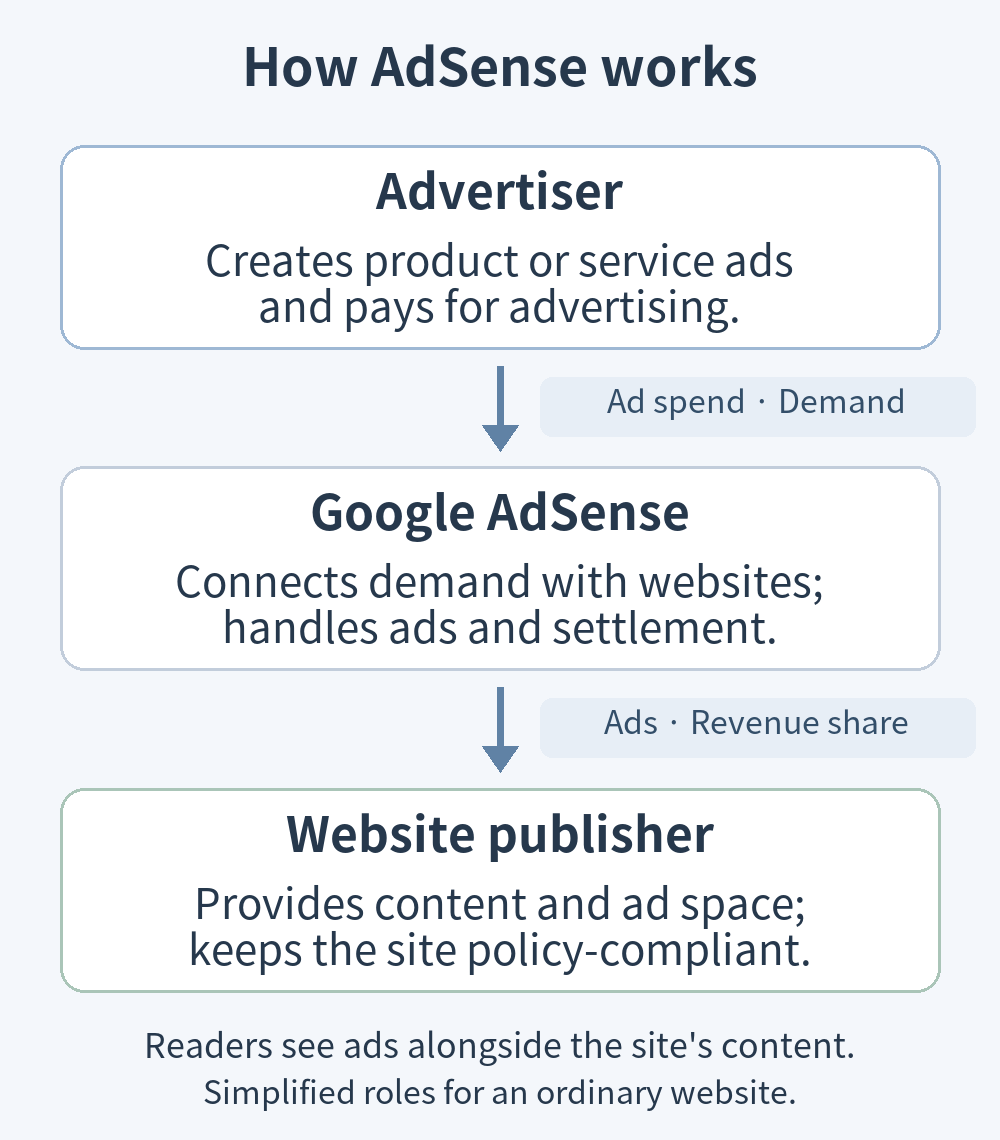
AdSense for Content currently pays publishers on an impression basis. Saying that no revenue is possible unless someone clicks an ad is therefore inaccurate. Distinguish the way an advertiser bids—for example, using clicks or conversions—from how a publisher is paid. Google's guidance explains the move to impression-based publisher payments. Artificially generating clicks or impressions remains prohibited.
Also check what a revenue-share percentage is applied to. According to Google's AdSense revenue-share guidance, AdSense for Content publishers receive 80% after the advertiser platform has taken its fee. Google gives the example that publishers retain about 68% of advertiser spending when display ads are purchased through Google Ads. This does not mean you always receive 80% of the advertiser's entire budget. A site connected to a platform partner may also have an additional revenue-sharing arrangement.
Page views and ad impressions are different measurements. One page can contain several ads, and some visits may not display an ad or meet the conditions for counting an impression. See why AdSense impressions can be lower than page views for ways to investigate the difference.
Page RPM (revenue per mille) expresses estimated earnings per 1,000 page views. The formula is estimated earnings ÷ AdSense page views × 1,000. Avoid mixing the page-view denominator with page views from another analytics tool. Google's page RPM definition explains the calculation.
For a hypothetical example, estimated earnings of US$20 from 10,000 AdSense page views give a page RPM of US$2. These figures illustrate the formula; they are neither average earnings nor a guarantee. Content topics, visitor locations, advertiser demand, and ad-serving conditions can produce different earnings even for sites with similar traffic.
What do you need before getting started?
Check both the account holder's eligibility and the state of the site before applying.
- Account and payee information: meet the age and contractual requirements applicable to your country and provide accurate information. If a minor applies through a parent or guardian, understand that the adult owns the account and receives payments. Select the billing country on the AdSense terms page to see the applicable terms.
- Control of the site: an ordinary website needs a way to add the required code or verification information, either through source access or an official integration. Submitting someone else's site address does not establish ownership. Read the site ownership and code-access requirements.
- Substantial original content: provide your own content that answers readers' questions. Copied articles, nearly empty pages, and numerous “under construction” screens do little to demonstrate a site's value.
- A working, accessible site: content and navigation should function, and visitors should be able to find information. Check that the site is publicly accessible for review and does not block Google's access.
- Policy and privacy preparation: comply with publisher policies and check the data-processing and consent requirements associated with advertising. These responsibilities continue after approval.
Google's site-readiness guidance emphasizes unique content, clear navigation, and user experience. It does not offer a guaranteed approval formula based on a fixed number of articles or words per post. Assess the information each page provides and the completeness of the site as a whole.
For example, a how-to article can explain prerequisites, actual settings, expected results, and ways to diagnose errors rather than merely listing step names. That gives visitors a reason to use the site; it is not a shortcut to guaranteed approval.
Account creation, site approval, and payment are separate stages. Having an account does not mean a site is approved to display ads. Similarly, approval and recorded earnings do not mean money can be paid immediately if identity verification or other payment requirements remain incomplete.
How do you go from applying to displaying ads?
The following process covers ordinary websites. Host partners such as Blogger and YouTube have their own signup and connection procedures. For a managed blogging service, first check the integrations it supports and any restrictions on advertising.
-
Sign up with a Google Account and enter payment information. Start with Google's AdSense signup guide and provide the required site and billing-country details. The payee name and address must be accurate because they are used for verification and payments. Complete identity verification when your account requests it. Google says that, starting in June 2026, verification may be required before ads can run and payments can be received; do not assume it only happens after earnings accumulate.
-
Add your site and apply a verification method. Register the URL you actually operate, then choose a method under “Connect your site to AdSense.” Current guidance lists an AdSense code snippet, an ads.txt snippet, and a meta tag. If you use the HTML code method, place the provided code between
<head>and</head>. Use the publisher ID and code supplied for your own account.In WordPress, the insertion location depends on the theme or code-insertion tool. Back up existing code before editing theme files, and check whether an integration already outputs the same code. After applying it, inspect a public page's source for the correct publisher ID and check that caching has not kept an older version in place. Using only a verification meta tag or ads.txt may still require separate ad-code setup to display ads. Follow Google's site connection instructions.
-
Confirm the connection, request review, and monitor the status. After confirming that installation is complete, choose “Request review.” Check progress under “Sites” and address the stated reason if changes are requested. Google's site-status guide distinguishes approval status from ads.txt status. Review times vary, so avoid building a plan around a promised approval date.
If verification fails, check that the registered domain matches the actual site, the code is complete, and passwords, firewalls, or crawler restrictions do not prevent access. If content or navigation is the issue, improve the affected pages using the account and site approval troubleshooting guide instead of repeatedly resubmitting an unchanged site.
-
After approval, configure Auto ads or individual ad units. In “Ads,” use the edit icon beside the site to open the ad settings preview and enable Auto ads. Review formats, ad load, and excluded areas before applying the settings. To control a placement yourself, go to “Ads → By ad unit → Display ads,” create a unit, and put its code in the intended location or your site's ad-insertion feature. Responsive units are generally convenient for adapting to screen widths.
Auto ads automate placement, not the publisher's responsibility to review it. When combining them with manual units, check that ads do not cluster in the same area. See the instructions for setting up Auto ads and creating a display ad unit.
-
Check ad display and payment readiness separately. On desktop and mobile, verify that ads do not obscure content or resemble menus and download buttons. If ads are missing, check site approval, code installation, account alerts, and the Policy center. Never click your own ads to test them.
In “Payments,” check outstanding tasks for identity, address verification, payment method, requested tax information, and payment holds. Payment thresholds vary by account currency; the standard payment threshold for a US-dollar account is US$100. Reaching the threshold alone does not satisfy every payment requirement.
Record the tools and insertion locations you use, along with the previous settings. If ads become excessive or disrupt the layout, adjust the relevant Auto ads format or excluded area, or remove a manually inserted unit to compare with the previous state. Change one setting at a time so you can identify the cause.
What should you watch out for when operating AdSense?
Start with legitimate impressions and clicks. Do not click your own ads, ask friends to click them, or inflate impressions using automated tools or traffic exchanges. Avoid layouts that suggest an ad must be clicked to download something or continue. Invalid traffic includes both deliberate manipulation and accidental clicks caused by poor implementation. Google's invalid-traffic guidance explains that ad-serving restrictions, account action, and differences between estimated and finalized earnings can result.
Approval requires continued content management. Do not publish copyright-infringing material or leave policy violations unaddressed. Check usage rights and sources for third-party images, video, and text, and moderate visitor contributions as well. Read the AdSense Program policies for specific obligations. One approval does not automatically permit all future content.
Keep ads, editorial content, and controls distinguishable. Do not design ads to be mistaken for menus or content links. On mobile, screen-covering ads, large gaps, and consecutive ads can interrupt reading. Before increasing ad volume, check that readers can finish an article and use the site's functions.
Privacy and consent requirements depend partly on visitors' locations. A consent management platform (CMP) collects and communicates advertising-related consent. Google requires a certified CMP when serving personalized ads to users in the European Economic Area (EEA), the UK, and Switzerland. A site in another language can still receive visitors from those regions, so the operator's location alone is not enough to decide what applies. Check Google's regional consent-management requirements and the “Privacy & messaging” settings. Installing a CMP does not by itself meet every privacy obligation: notices and implementation must reflect actual data use and applicable law.
Review account alerts and the Policy center regularly. When an issue appears, identify the affected site or page, the issue type, and the required action before making corrections and requesting any available review. Also investigate unexplained traffic sources and unusual changes in performance.
What kinds of blogs are a good fit for AdSense?
Consider AdSense for sites that regularly provide public content and want advertising as an additional revenue source. Access to advertiser demand without negotiating every contract is an advantage. However, traffic, the advertising market, policies, and serving status affect earnings, while content production and site management continue to take time and money.
| Site situation | What to consider |
|---|---|
| An information blog with regular readers | Can ads fit the reading flow, and does actual revenue justify operating costs and management effort? |
| A new blog with little content or traffic | Prioritize content quality and attracting readers rather than planning around short-term advertising income. |
| A site focused on inquiries, bookings, or sales | Compare advertising income with the risk of interrupting inquiries or purchases. Consider excluding important conversion pages. |
| Educational or reference content requiring concentration | Check whether ads interrupt understanding or make learning, copying, or downloading difficult. |
Ask not only whether the site can obtain approval, but also whether advertising fits its readers and goals. If you proceed, prepare the necessary content and policies, then adjust placements using ad-display checks, revenue metrics, and evidence of inconvenience to readers.