Joomla and Drupal Explained: How They Compare with WordPress
Joomla and Drupal are open-source content management systems (CMSs) that manage the content, images, pages, and users behind a website, much like WordPress. All three can run a blog or business website, but they organize content, add features, and manage permissions and translations differently. The right choice depends on whether your main job is publishing articles or coordinating people who maintain information with a defined structure.
This comparison uses the WordPress.org software installed on hosting you arrange as its WordPress baseline. WordPress.com is a hosted service with different plans and management responsibilities. Similarly, distinguish Joomla or Drupal software from a hosting service that operates it for you.
What is a CMS, and what do these three systems have in common?
A content management system lets you enter information through an administration interface instead of writing a new HTML file for every page. You save titles, body text, images, and classifications; the CMS combines that information with display rules to generate the pages visitors see.
Consider an events website. An administrator enters an event description, while visitors see an event detail page and event listings. The CMS connects the editing interface, stored information, listings and detail pages, and the permissions of signed-in users. It is both a way to present a website and a way to keep managing the information inside it.
- All three are open source. Their source code is available for use and modification under their respective licenses. Free core software does not mean a website costs nothing to operate.
- They need a server environment. A public site normally requires hosting, a domain, a database, and file storage. You can also set up a separate environment on your computer for evaluation.
- Their features can be extended. Each provides ways to change presentation and functionality, with custom development available when required.
- Ongoing maintenance remains necessary. Account management, updates, backups and recovery, and extension compatibility do not end when installation finishes.
Choosing only by which demo looks best can hide differences in everyday work. Two similar-looking sites may have very different procedures for entering articles, adding menus, and updating translations. If WordPress itself is unfamiliar, our guide to WordPress features and costs provides a useful starting point.
The official introduction to Joomla describes a free, open-source CMS. Beyond creating and categorizing articles, you can combine menus, supporting page areas, user access, and content in several languages. It is worth examining when a single site needs different sections, such as company information, announcements, resources, and members-only pages.
In Joomla, an Article is a regular piece of written content. A Category groups articles, while a Menu Item connects a visitor's navigation choice to a particular page and display format.
For example, an “About us” menu item could display one article, while “News” could show articles from a category. The menu item documentation lists different types, including Single Article and Category Blog. Here, “Blog” also names a listing layout; it does not mean Joomla is limited to blogging.
At first, saving an article and deciding how visitors reach it may feel like disconnected tasks. Treat content entry and navigation/display configuration as separate responsibilities. As your article collection grows, consider category listings before creating a separate menu item for every article.
Components, modules, and plugins work together
Joomla calls its additional software Extensions. Several terms within that system are particularly useful to understand.
- Component: Provides a main feature and its screens in the central content area. Article management and contacts are useful examples to begin with.
- Module: A supporting display unit placed in a page position, such as a menu, login box, or list of recent articles.
- Plugin: An extension type that responds to particular operations or processes content to modify behavior.
- Template: Defines the site's presentation and arrangement of page areas.
The Joomla extension types guide explains these roles. WordPress uses “plugin” broadly for additional functionality; in Joomla, a plugin is one specific type of extension. A direct one-to-one translation of the terminology can be misleading.
Modules use positions supplied by the template and display assignments associated with menu items. Creating a login module and confirming that it appears on the intended page are separate checks. The module documentation explains that relationship.
Built-in features still require decisions and configuration
Joomla includes access control, multilingual capabilities, custom fields, and publishing workflows. Review its core features before deciding which additional extensions you need.
“Included” does not mean “already configured” or “sufficient for every requirement.” You still decide who may view information, which menus each language needs, and who reviews and publishes content. Joomla is a useful candidate when you want to design these operating rules alongside the site's structure.
What is Drupal? A CMS for modeling content types and relationships
Drupal is an open-source platform that lets you define how information is stored, how different items relate, and how they appear in lists. You can use it for a simple blog, but its structural approach becomes more apparent when a site connects events, courses, organizations, staff, and resources.
Content types and fields define the editing structure
A Content Type defines an input structure shared by items with the same purpose. A Field is an individual part of that structure, such as a title, date, image, number, or reference to another content item.
An “Event” type could contain a name, date, and location; an “Instructor” type could contain a name, biography, and photograph. An event could then reference its instructor. Instead of putting everything into free-form body text, you store dates in date fields and refer to a separately maintained instructor record. Drupal's content structure documentation explains these concepts.
This supports consistent entry and reuse. However, too many fields and relationships can make an editing screen difficult to use. Start with information you actually need for searching, displaying, and managing the site rather than adding fields merely because they might become useful someday.
Views turns stored information into useful listings
Drupal's Views selects stored content according to conditions and presents it as lists. Views and Views UI are included in core and let administrators configure selection and display settings. The Views concept guide introduces displays such as tables, lists, and blocks.
For example, you could enter an event once and use it in “Upcoming events,” “Events in Seoul,” and “Education events.” Separate date and location fields make these conditions easier to manage. This describes a possible configuration, not lists that appear automatically immediately after installation.
Conditions, sorting, access, and placement must work together, so setting up the initial structure can be more demanding than writing a single article. Once the structure is prepared, everyday contributors can use a defined input screen. Assess the difficulty for the person building the site separately from the difficulty for someone maintaining its content.
Distinguish Drupal Core from Drupal CMS
It is no longer enough to describe every Drupal project as something a developer must assemble entirely from scratch. The official Drupal introduction distinguishes Drupal Core, the underlying platform, from Drupal CMS, a product that packages features and configuration on that foundation.
Drupal Core is a foundation for custom websites. Drupal CMS offers a more prepared starting environment for site builders and content teams, including visual page editing. The initial tools and workflow depend on which installation you choose, even though both belong to Drupal.
Do not judge all current editing experiences by an old Drupal screen. Equally, a convenient Drupal CMS starting screen does not remove the design work required by complex requirements. Record whether you are evaluating Core or CMS, together with the additional modules and themes in the installation.
What should the WordPress comparison include?
WordPress publishes posts and pages and extends a website through themes and plugins. Its official feature overview covers business sites, communities, and other website types as well as blogs. “WordPress can only make a blog” is not an accurate comparison.
Posts, pages, and blocks offer a familiar starting point
A typical starting workflow involves creating posts and pages, then arranging paragraph, image, heading, and other blocks in the editor. A theme controls presentation; plugins can add contact forms, multilingual content, or an online shop.
For a straightforward blog, being able to begin with writing can be an advantage. However, a complicated page builder combined with many extensions can increase configuration and maintenance work. WordPress is not a guarantee that every site will remain simple.
Structured content and custom development are also possible
WordPress can represent events, products, and employees using Custom Post Types, taxonomies, and metadata. The post type documentation explains part of that foundation. Dedicated editing screens and conditional listings may require appropriate plugins or development.
The distinction between these CMSs is rarely just “possible versus impossible.” A more useful comparison asks which tools are included, which requirements need additions, and whether your team can maintain the resulting setup.
WordPress, Joomla, and Drupal compared at a glance
This table compares common starting points and configuration approaches. It does not score the quality of finished websites or establish an absolute ranking. Actual effort depends on the themes, extensions, installation configuration, and people involved.
| Criterion | Self-hosted WordPress.org | Joomla | Drupal |
|---|---|---|---|
| Basic concepts | Posts, pages, blocks, themes, plugins | Articles, categories, menu items, components, modules | Content types, fields, taxonomy, Views, modules |
| Extending content structure | Custom post types and metadata through development or extension tools | Articles, categories, and custom fields; dedicated components when needed | Administrative tools for types and fields, with relationships and listings designed around them |
| Additional functionality | Plugins | Extensions, including components, modules, and plugins | Modules |
| Presentation | Themes; editing scope depends on the theme and tools | Templates; check module positions and menu assignments | Themes; also check layout tools and display configuration |
| Permissions | Roles and capabilities, with extensions or development for detailed requirements | ACL separates user groups, viewing access levels, and action permissions | Roles and permissions combined with content workflows |
| Multilingual content | Requires a solution beyond core, such as plugins or separate sites | Core features connect language-specific content, menus, and translations | Enable and configure core language, interface, content, and configuration translation modules |
| Publishing process | Draft, pending review, scheduled, published, and other states; investigate complex approval chains separately | Configure user groups together with publishing workflows | Define states and transitions with tools such as Workflows and Content Moderation |
| First evaluation question | Can you keep the required theme and plugins manageable? | Can the team understand the relationship between articles, menus, modules, and permissions? | Who will design and maintain the content model and operating rules? |
| Situations worth evaluating | Starting with article publishing and adding necessary functionality | Combining navigation, member access, and several languages | Managing related information types, listings, and editorial procedures systematically |
A feature's inclusion in core does not determine its total cost or difficulty. Learning a built-in feature can take time; one well-matched extension can reduce work. Conversely, overlapping extensions or incompatible storage approaches can increase long-term maintenance.
How would the same events website differ?
Imagine a site where editors enter an event's name, date, location, and topic, while visitors see event details and topic listings. This is a hypothetical design example, rather than a report of a real implementation or performance test.
| Input | Why store it separately? | Decide first |
|---|---|---|
| Event name | Used in titles, search results, and listings | How to distinguish different editions with the same name |
| Date and time | Used for chronological sorting and upcoming/past status | Time zone, end time, and how changes or cancellations appear |
| Location | Used in details and regional browsing | How to enter online events or a venue not yet confirmed |
| Topic | Used in topic listings and search filters | Whether choices are predefined and multiple topics are allowed |
For a few events without special sorting, a title and body text may be enough to begin. Once you need date ordering, regional filters, or reuse across several displays, consistent fields for dates, venues, and topics become easier to maintain.
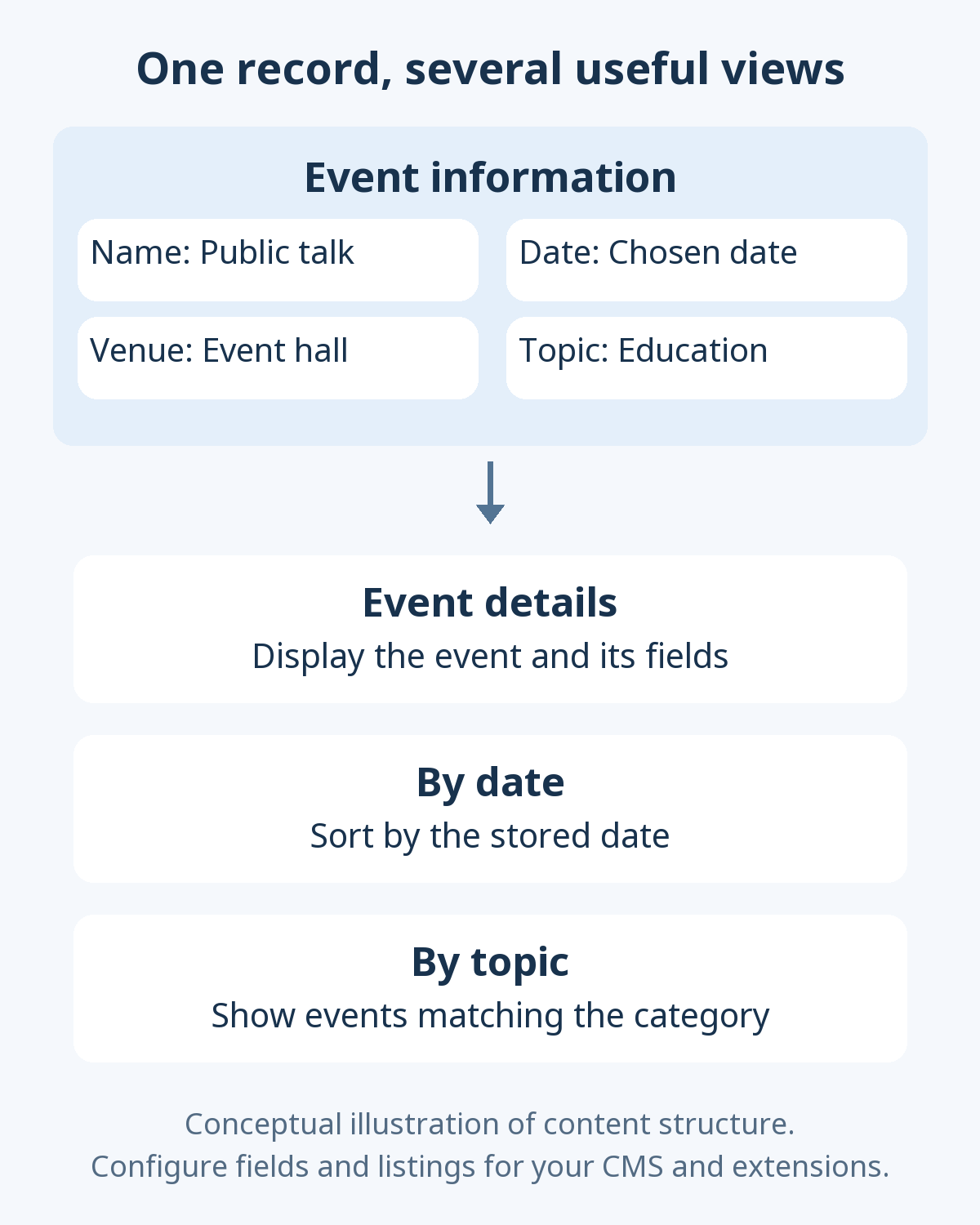
In WordPress, you could begin with ordinary posts or choose tools for an event-specific post type, fields, and listings. In Joomla, first examine what article categories and custom fields cover; consider dedicated extensions when filtering, booking, or registration exceeds that scope. Joomla's fields and field groups documentation describes adding attributes to items such as articles. Creating fields does not automatically finish every search and sorting screen.
In Drupal, you could define an event content type, fields, and taxonomy, then build listings with Views. Registration, payments, and capacity management still require separate consideration from simply displaying an event. Showing a date does not turn any of these CMSs into a complete booking system.
The useful question is less “Which has more features?” and more “When someone changes the event date, do all relevant displays update consistently, and can the next editor enter information in the same way?”
How do permissions and review workflows compare?
Permissions define who can perform which actions. A workflow defines the states content passes through. Having an editor account does not, by itself, implement your organization's approval process.
WordPress roles and capabilities distinguish what different users can do. Start with the available roles, then investigate additional design needs for requirements such as editing only a particular department's articles or obtaining several approvals.
Joomla's Access Control List (ACL) distinguishes user groups, viewing access levels, and action permissions. Its access control guide separates “may view” from “may create or edit.” Showing a menu to members and allowing those members to edit its content are different settings.
Drupal adds core modules such as Workflows and Content Moderation to its roles and permissions system. The Content Moderation documentation also describes reviewing a separate revision while an existing version remains published. Check the actual initial states and configuration against the installation, enabled modules, and permissions you use.
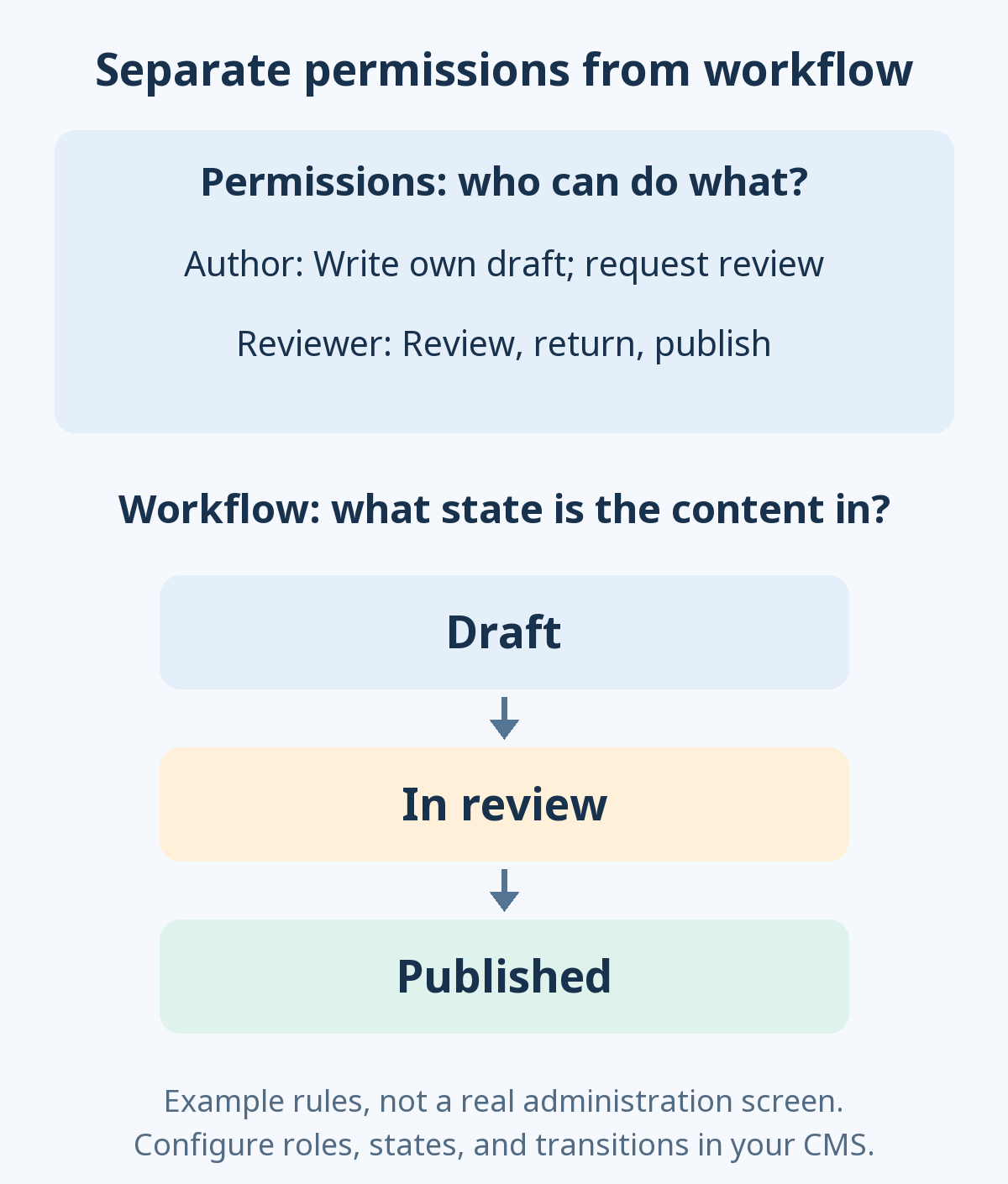
Write the operating rules first, then compare how each CMS can implement and verify them. The following job labels are examples, not necessarily the products' default role names.
| Example responsibility | Allow | Restrict |
|---|---|---|
| Author | Create drafts for their department and request review | Publishing without approval or editing another department's material |
| Reviewer | Edit, return content for revision, and approve at defined stages | Changing site-wide settings or account permissions |
| Site administrator | Manage accounts, permissions, updates, and recovery | Avoid routinely sharing administrator access for everyday writing |
After configuration, test as an author, a reviewer, and a signed-out visitor, rather than only as an administrator. Hiding a menu is different from restricting direct access to its URL. Check members-only files through their file URLs as well, and look for unintended exposure in search results, caches, and previews.
What differs on a multilingual website?
Changing the administration interface to another language is different from serving visitors translated articles. The first concerns interface language; the second involves maintaining language-specific content, menus, URLs, and image descriptions. Keep those tasks separate when comparing CMSs.
The WordPress multilingual documentation explains that core does not provide a complete multilingual blog out of the box. Options include plugins that connect translations and arrangements using separate sites. Our comparison of WordPress multilingual plugins examines differences in content storage and operating requirements.
Joomla provides features for language-specific content and menus, with associations between corresponding articles, categories, and menu items. Multilingual Associations manages these relationships. Installing a language pack does not translate your articles and menus. Follow the multilingual setup guide to check how languages, menus, and modules connect.
Drupal supplies core modules for language, interface translation, content translation, and configuration translation. You can choose translation scope by content type and field. The content translation configuration guide explains selecting what is translatable.
For instance, you may translate an event's name and description but need a policy for whether each language maintains a separate date or shares it. Images may be reusable, yet embedded text and alternative text still need language-specific checks. Evaluate actual tasks rather than only a “multilingual support” label:
- Does changing language on an article take the visitor to its corresponding translation?
- What happens when a translation is missing: a notice, a language homepage, or another behavior?
- Can you manage menus, categories, form instructions, and error messages as well as article text?
- Can the responsible person identify translations that need checking after the original changes?
Multilingual features organize translation work. They do not automatically guarantee accurate translations or permanently consistent information across languages.
How do design and extensions differ?
WordPress themes, Joomla templates, and Drupal themes all shape presentation. However, editable scope and connections to content structure differ. Check detail pages, listings, search results, and mobile menus as well as a demo's homepage.
For WordPress, the official theme directory and plugin directory are useful starting points. Check whether a theme supports the editing approach you want, needs a separate builder, and has paid features with renewal conditions. Our guide to finding and choosing WordPress themes explains practical selection criteria.
In Joomla, understand the template's module positions and display arrangements. Find additional functionality through the Joomla Extensions Directory. Confirm whether an item is a component, module, or plugin, which Joomla versions it supports, and whether it requires other extensions.
Drupal's module listings and theme listings provide information on compatible versions, maintenance, and security advisory coverage. When your project involves designing both content structure and output, changing a theme alone will not create every required editing screen and listing.
Extensions for these CMSs are generally not interchangeable installation packages. You cannot simply install a WordPress plugin in Joomla or a Drupal module in WordPress. Find a tool with the relevant purpose, then check where it stores data and what happens during removal or migration. Our guide to finding WordPress plugins also distinguishes selection, installation, activation, and configuration.
Which CMS is better for SEO, GEO, and AEO?
A CMS name alone cannot establish an advantage in search visibility or citations in generated answers. Search engine optimization (SEO) helps search engines discover and understand content. Answer engine optimization (AEO) emphasizes clear answers to users' questions. Generative engine optimization (GEO) considers how content can be understood and used accurately in generative search and answers. Information quality and actual page output matter within any CMS.
Instead of accepting an “SEO features included” claim, check whether your team can manage and verify these items on the finished pages:
- The answer: Does the introduction address the title's question, with sufficient conditions, exceptions, and evidence in the body?
- Page structure: Are headings, tables, lists, and image descriptions appropriate to their meaning?
- Discovery and access: Are relevant internal links present, and is public content readable without signing in?
- URLs and duplication: Can you maintain desired addresses, redirects after changes, and canonical URLs?
- Search presentation: Do indexing directives, descriptions, and language relationships match your intentions?
- Reliability: Are important claims supported, without invented experience or testing?
Some items may use built-in settings; others may need extensions or development. A theme or SEO extension change can alter the output, so verify the resulting page rather than relying exclusively on administrative settings.
Structured data should describe content actually visible on the page. A comparison article is not a reason to add fabricated ratings or reviews, and special files or markup do not guarantee generative search visibility. The useful CMS question is how easily your team can maintain accurate output over time.
Evaluate performance, accessibility, and security in the actual setup
Compare important pages under similar conditions
Claims that WordPress is always slow or Drupal is always fast are not useful. Hosting, content queries, image size, themes and extensions, advertising and analytics scripts, and caching can all affect performance. The number of plugins or modules alone is not a reliable speed measure.
Use similar content, images, and required features in evaluation sites. Inspect listings, searches, and detail pages as well as the homepage. Compare signed-in and signed-out use, mobile screens, and first and repeat visits. A quick demo homepage can conceal a slow search experience.
Accessibility concerns whether people with disabilities and people using different input devices can use the site. Test keyboard navigation in menus and forms, understandable heading structure and validation messages, and adequate text contrast. CMS features do not automatically make every theme, extension, or piece of content accessible.
Decide who owns updates and recovery
Security is also not guaranteed by a product name. Use supported software, follow core and extension advisories, grant only necessary permissions, and make recovery possible. The WordPress security guide treats security as layered risk reduction rather than complete risk elimination.
Switching CMSs will not fix shared passwords or the absence of someone responsible for updates. Check the hosting provider's management scope: server management may not include checking every site extension or restoring every kind of failure.
Before operation, prepare a checklist of key actions to verify around updates: saving articles, uploading photographs, submitting forms, accessing member content, and switching translations. A backup's value depends on restoring it in a separate environment, not merely having a file on the same server.
Free software still has implementation and maintenance costs
Although the core software is available without a purchase price, total website costs differ. An initial development quote can omit hosting renewals, extension subscriptions, later changes, and handover. Compare the same period and scope:
| Cost area | What to check |
|---|---|
| Hosting and domain | Initial and renewal charges, required server environment, storage, traffic, and backup coverage |
| Design and functionality | Theme/template and extension usage terms, renewals, and connected service fees |
| Design and implementation work | Content types, fields, taxonomies, permissions, translation structure, and page construction |
| Maintenance | Update checks, incident response, upgrades after support ends, and compatibility work |
| Migration and handover | Moving content and files, handling existing URLs, administrator training, documentation, and account transfer |
Publishing articles and maintaining the underlying software environment are different responsibilities. PHP, for example, is the server-side language used to run these CMSs. Each CMS and extension has supported PHP and database version requirements. Successful installation on an old host does not establish suitability for long-term operation.
Drupal documents updating core with Composer. Composer manages PHP packages and their version relationships. Depending on the setup, someone needs to handle development and deployment tasks, but that person does not have to be the content author.
Drupal's configuration management can help prepare content types, fields, and Views in a test environment and deploy configuration through files. A configuration export is not a full backup containing all article text and uploaded files.
WordPress likewise requires both database and file considerations, as its backup guide explains. When comparing WordPress backup tools, examine storage location, restore scope, and recovery procedures, not only the backup button. Ask the same questions of Joomla and Drupal.
Which CMS should you investigate first?
The following are starting points for evaluation, not claims that only one CMS can meet a particular requirement. They identify what to inspect first to make a useful decision.
| Website requirement | Start by examining | Also verify |
|---|---|---|
| A solo, article-focused blog | WordPress writing tools, a suitable theme, and a minimal plugin setup | Requirements beyond publishing and who will manage updates and backups |
| An organization mixing public and member information | Joomla menus, modules, access control, and core features | Actual membership rules, file protection, extensions, and learning effort |
| Related events, courses, organizations, or resources | Drupal content types, fields, Views, and workflows | Content model ownership, long-term maintenance, and the Core/CMS starting point |
| A team already experienced with one CMS | Improving the existing CMS as well as switching | Whether extension or structural changes solve the problem and justify migration costs |
| A multilingual content site | The same translation tasks in all three systems | Who maintains articles, menus, fields, search, and missing translations, and how |
Growth does not require choosing the most complicated tool at the beginning. What matters is reliably meeting today's needs while supporting future information structures and staffing. Conversely, quickly building a few basic pages does not prove that complex operation will require equally little effort.
Run the same small trial before choosing
A small site built with the same material and requirements reveals more than freely clicking around three demos. Use fictional, non-sensitive material before uploading an organization's full content. Record the installation, version, and extensions used.
- Write down essential requirements. Identify indispensable pages, announcements, event listings, author/reviewer accounts, and languages. “Must be extensible” is less useful than a requirement you can verify.
- Create an introduction and sample content. Use comparable amounts of introductory material and several information types. Record the work needed to change a title, photograph, and category, along with unfamiliar terminology.
- Separate structured information. Store event dates and locations where sorting and searching can use them. Verify that detail pages and listings agree. Record extensions or development needed for unsupported requirements.
- Use different permission levels. Have an author create a draft and a reviewer publish it. Check that prohibited publishing, deletion, and editing of other people's material are actually blocked.
- Add another language. Translate an article and menu, verify language switching to the matching article, and inspect what happens when a translation is absent.
- Test the visitor experience. While signed out, use mobile layouts and keyboard navigation in menus, lists, and forms. Distinguish administrator-only functions from public content.
- Check maintenance in a test environment. Back up and restore into a separate environment, then verify key pages, images, and account access. If testing an update, follow the provider's procedure, compare before and after, and establish how to recover from failure.
The desired result is more than a successful installation message. You want the next person to add content consistently, required listings and permissions and translations to behave correctly, and a workable recovery path.
Joomla's getting-started introduction explains its article, menu, and module structure. Drupal's evaluator guide describes ways to explore Drupal Core and Drupal CMS locally or remotely. Check the relevant service's evaluation conditions and data retention policy.
What should you check before migrating an existing website?
Changing CMSs changes more than the administration interface. Investigate how categories, users, images, attachments, custom fields, translation relationships, permissions, and form data will move alongside posts and pages. Existing theme and extension settings should not be assumed to work unchanged in another CMS.
First migrate a sample. Compare image paths, dates, authors, internal links, public/private status, and language switching as well as titles and body text. If URLs change, prepare an address mapping and redirects, then check canonical URLs, sitemaps, and internal links.
If your WordPress difficulties stem from poorly organized content or unclear management responsibilities, those problems may survive a CMS switch. If the current structure cannot reasonably handle the information model and publishing process you need, a practical Joomla and Drupal evaluation is worthwhile.
Choose by the fit between the content you manage, the people doing the work, and the maintenance you can sustain, rather than popularity or the length of a feature list. Defining those three things makes it clearer whether to start with WordPress, use Joomla's operating structure, or build a content model in Drupal.