What Are Stock Content Sites? Five Platforms and Image Licensing Basics
A stock-content site lets you find photos, illustrations, vectors, videos, and other assets, then obtain a license to use them under stated conditions. Downloading a file does not transfer its copyright to you, and even a free asset comes with terms you should check. This guide introduces five well-known stock sites and explains what to review before using an image in a blog post, advertisement, or publication.
What is a stock-content site?
Stock content is made in advance for licensing to multiple customers, rather than created specifically for one client's brief. On a stock site, you search for a subject and format, choose a photo or video, and use it according to the license attached to that file. Some services offer illustrations, editable vector graphics, video, and audio as well as photography.
The key distinction is that buying a file and acquiring ownership of its copyright are not the same thing. Usage restrictions can vary from one image to another on the same platform. A photograph that illustrates a news event in an article, for example, may raise different rights questions when used to advertise a product.
How do free, paid, and royalty-free differ?
Free versus paid describes the cost of obtaining an asset or its license. Royalty-free (RF) describes a license model: after obtaining the license, you do not pay another royalty each time you reuse the asset within its permitted scope. It does not mean the image costs nothing or has no copyright. Both the Getty Images content license agreement and iStock's licensing explanation distinguish royalty-free use from a zero price.
Free downloads still have license terms. For example, Adobe Stock says its free collection follows the same licensing standards as its paid assets. Nor does paying for a file automatically authorize every use. Selling merchandise printed with an image or placing it in a template for resale may require additional rights.
A rights-managed (RM) license, by contrast, specifies a scope of use that may depend on the medium, territory, duration, placement, and other agreed conditions. With either royalty-free or rights-managed content, check the specific asset page and the agreement that applies when you license it.
Five well-known stock sites
These are examples chosen for their recognition and range of material, not a ranking by quality or price. Collections and license terms can change, so make your final decision using the page for the individual asset you intend to use.
Adobe Stock
Adobe Stock offers photos, illustrations, vectors, video, and other creative assets. Its free collection is a useful place to see whether the subject and format you need are available before paying. A free download does not, however, authorize every type of merchandise or redistribution. Once you choose an image for your blog, check the Adobe Stock license terms for the differences among Standard, Enhanced, and Extended licenses and for any “Editorial Use Only” label.
Shutterstock
Shutterstock supplies video, music, and sound effects as well as photos and graphics. Its image licenses include a Standard option for many common web uses and an Enhanced option with additional permissions. If you plan to put an image on merchandise for sale or in a template for resale, do not assume a Standard license covers that use. Shutterstock's Standard and Enhanced image license comparison explains the differences by use case.
Getty Images
Getty Images is worth exploring for creative imagery as well as editorial photographs of news, sport, and entertainment. Depending on the asset, licensing may be royalty-free, rights-ready, or rights-managed. Be especially careful if you want to use an editorial photo in an advertisement or substantially alter it. The Getty Images content license agreement sets out separate restrictions on commercial use and editing of editorial content.
iStock
iStock lets you search photos, illustrations, vectors, and video. It can be a starting point for visuals used on a blog or website, and downloads generally come with a Standard license. Products for resale and some template uses may require additional permissions. Before purchasing, read the iStock content license agreement against the file and final use you have in mind.
Alamy
Alamy includes photos, vectors, and video alongside editorial and archival imagery. Assets on the same platform may differ in whether they are royalty-free, rights-managed, or restricted to editorial use. If the image will appear in an advertisement or promotion, check whether releases for identifiable people or property are needed. Alamy's image licensing guide compares uses and restrictions.
How should you choose a site for your project?
Start with what you are making and where it will appear, rather than asking which site is “best.” The table narrows down where to begin a search. It does not mean that every file on a listed site is licensed for that purpose.
| Asset and intended use | Sites to explore first | What to check |
|---|---|---|
| Photos and illustrations for a blog or website | Adobe Stock, Shutterstock, iStock | Subject, file format, web publishing rights, and commercial-use terms |
| News, public figures, and historical events | Getty Images, Alamy, Shutterstock | Editorial-only labels, credit requirements, and limits on advertising or promotion |
| Video or audio | Adobe Stock, Shutterstock, Getty Images, iStock, Alamy | The separate video or music license, permitted media, and distribution scope |
| Exploring assets before paying | Adobe Stock's free collection | Whether the chosen asset is free and what its actual license permits |
For an ordinary blog header, you might choose a subject and aspect ratio first, then check the terms for publishing it on the web. For a photograph of a historical event in a product-promotion banner, the right to use it in advertising comes first. If an attractive image is not licensed for your purpose, choose another or obtain the necessary permission.
What should you check before downloading an image?
License documents differ across platforms, but these questions form a practical checklist for an individual asset.
- Where will you use it? An informational article, business promotion, paid advertisement, book cover, and product for sale are different uses. Do not assume an “Editorial Use Only” image can be placed in advertising or promotional material. Shutterstock's editorial-content guide distinguishes permitted and restricted examples.
- Which license applies? Confirm whether the asset is free, Standard, Enhanced, Extended, or rights-managed. Print runs, merchandise, templates, and file sharing among team members can have additional conditions.
- Are the rights of people, property, and brands addressed? For commercial use, check whether an image of identifiable people, private property, artwork, or trademarks requires a release or other clearance. The fact that a platform sells the image does not automatically settle every third-party right. Alamy's explanation of model and property releases shows why this matters.
- What are the limits on edits, redistribution, and attribution? Check restrictions on altering the meaning of an editorial image, letting others download the original file, or using the asset as a logo. If a credit is required, record its wording and placement.
- Can you document your right to use it later? Keep the asset ID, the license you selected, the purchase or download record, and the terms that applied. That makes future edits and team handoffs easier to check.
An advertisement-supported blog post is not automatically classified as either editorial or commercial for every licensing purpose. The nature of the article, how the image is used, and the platform's agreement all matter. If a particular file's permitted use is unclear, ask the platform before using it.
The asset's license matters more than the site's name
Stock sites can help you find visuals quickly, but choosing a famous platform does not by itself authorize your intended use. Decide what asset you need and where you will publish it, compare suitable candidates across a few sites, then check the file-specific license, editorial label, and any additional rights. The image whose terms fit your project is the useful choice.

Blogging in the AI Era: A Practical Content and Traffic Strategy
How can blog owners stay useful as AI search changes discovery? Learn how to build distinctive posts, improve existing content, create return paths, and measure results that matter.
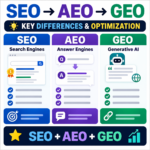
SEO vs. AEO vs. GEO / Key Differences and How to Use Them
Compare SEO, answer engine optimization, and generative engine optimization, then learn how clear answers, credible evidence, and useful structure support all three.

Does Mass-Produced AI Content Hurt Search Rankings? Google and Bing Policies
AI-assisted content is not penalized simply because AI was used. Learn how Google and Bing treat scaled content, which publishing patterns create risk, and how to build a responsible review workflow.
How to Convert Images to WebP / PhotoScape X and Online Tools
Learn how to convert JPG and PNG images to WebP with PhotoScape X or a browser-based tool, choose a useful quality setting, and avoid common publishing problems.

What Is Affiliate Marketing? A Beginner's Guide for Bloggers
Learn how affiliate links, qualifying actions, and approved commissions work. This guide also covers choosing a program, writing useful recommendations, and disclosing financial relationships clearly.

Google Analytics / How to Exclude a Specific IP Address in GA4
Exclude your home, office, or development traffic from GA4 by defining internal IP addresses and testing an exclusion data filter before activation.

What Are Stock Content Sites? Five Platforms and Image Licensing Basics
Learn what stock-content sites offer and how Adobe Stock, Shutterstock, Getty Images, iStock, and Alamy differ. Check free and royalty-free terms, editorial limits, and image rights before you download.

WordPress vs Tistory: Costs, AdSense, Control, and Migration
Compare WordPress and Tistory on cost, maintenance, AdSense approval and ad rules, search visibility, and portability. Use practical criteria to choose the right blogging platform for your plans.