GPT-6 vs. GPT-5.6: Six Models Compared by Use Case and API Cost
The main difference among GPT-6 Astra, Sol, and Luna and GPT-5.6 Sol, Terra, and Luna is where each model sits on the quality, efficiency, and API cost spectrum. Start with GPT-6 Astra for the hardest open-ended work, evaluate GPT-6 Sol when you need a balance of capability and cost, and test GPT-6 Luna for well-scoped tasks at high volume.
Within the GPT-5.6 family, Sol is the flagship, Terra balances intelligence and cost, and Luna targets cost-sensitive workloads. The shared Sol name does not mean GPT-6 Sol and GPT-5.6 Sol occupy the same position within their respective families.
Scope: OpenAI API models, not subscription plans
This comparison covers gpt-6-astra, gpt-6-sol, gpt-6-luna, and the three GPT-5.6 models. An application programming interface (API) lets software call the model. These token prices are separate from ChatGPT and Codex subscriptions; model access, reasoning options, and usage limits in those products also vary.
GPT-6.1 Sol is available by October 2026, so GPT-6 Sol should not be read as the newest Sol model. This article retains its six-model comparison for readers evaluating those models or an existing deployment. See the GPT-6.1 Sol article and current official model guide for the successor separately.
The documented roles are starting points, not a measured ranking for every workload. The official selection guide recommends comparing the same inputs across models and reasoning settings. Newer recommendations in that guide should not be attributed automatically to the older GPT-6 Sol model.
Six models at a glance
| Model | Position in its family | Good starting use cases | Input price | Output price |
|---|---|---|---|---|
| GPT-6 Astra | Highest capability | Complex reasoning, research, coding, computer use, and demanding deliverables | $10.00 | $50.00 |
| GPT-6 Sol | Capability and cost balance | Everyday coding, research, writing, and workflows using tools | $2.00 | $10.00 |
| GPT-6 Luna | Most efficient GPT-6 model | Classification, extraction, simple transformations, and high-volume automation | $0.10 | $0.50 |
| GPT-5.6 Sol | GPT-5.6 flagship | Complex professional work, coding, front-end development, and tools | $4.00 | $20.00 |
| GPT-5.6 Terra | Intelligence and cost balance | Moderately complex analysis, document processing, and automation | $2.00 | $12.00 |
| GPT-5.6 Luna | Cost-sensitive GPT-5.6 model | Simple extraction, classification, summaries, and repeatable workflows | $0.20 | $1.20 |
The table reflects the six official model pages checked on October 22, 2026. Prices are in US dollars per one million text tokens under Standard processing for short prompts, excluding tool charges. Cached input, long-context requests, Batch, Flex, and Fast processing can use different rates. Check the current OpenAI API pricing page before deploying a workload.
How do Astra, Sol, Terra, and Luna relate?
The GPT-6 family consists of Astra, Sol, and Luna. Astra targets the most demanding work, Sol balances capability and cost, and Luna emphasizes efficiency. GPT-5.6 uses Sol, Terra, and Luna for its flagship, balanced, and efficient tiers. OpenAI describes GPT-5.6 Terra as roughly corresponding to an earlier mini tier and GPT-5.6 Luna to an earlier nano tier. The API alias gpt-5.6 points to GPT-5.6 Sol.
| Role within the family | GPT-6 | GPT-5.6 |
|---|---|---|
| Highest capability | Astra | Sol |
| Balanced tier | Sol | Terra |
| Efficiency tier | Luna | Luna |
This table describes roles within each family. It does not claim that models in the same row have equal quality, speed, or features across generations. In particular, GPT-6 Sol is the balanced GPT-6 option, whereas GPT-5.6 Sol is the GPT-5.6 flagship.
GPT-6 Astra: for the hardest end-to-end work
The model ID is gpt-6-astra. OpenAI presents Astra as its most capable model for complex reasoning, software engineering, computer use, research, and document creation. It is the strongest starting candidate when a task requires several steps across files, tools, and uncertain requirements.
- Projects with incomplete requirements that require careful judgment
- Long coding workflows spanning design, implementation, and verification
- Research that must reconcile conflicting sources and explain uncertainty
- Complex work involving documents, data, browsers, and professional software
Astra has the highest listed token prices in this comparison. Yet the GPT-6 model guide reports that in some evaluations it produced stronger results with fewer output tokens than earlier models. That observation does not establish its cost for your workload: compare total cost per accepted result, including retries and review.
GPT-6 Sol: a balance of capability and cost
The model ID is gpt-6-sol. It is designed for complex coding and agentic workflows at a lower listed token price than Astra. Sol is worth testing when the goal is clear but the work still needs judgment, tool use, and a polished result.
- Routine feature development, debugging, code review, and tests
- Writing that requires research and source checks
- Workflows across spreadsheets, documents, browsers, and files
- Multi-step tasks whose ambiguity does not justify the highest-capability model
Within these six models, Sol can be a practical baseline when cost matters. Compare Astra if it misses important requirements, and Luna if a narrower task may pass at lower cost. This is an evaluation strategy for the comparison, not a claim that GPT-6 Sol is the current default in every product. Current official coding documentation also discusses GPT-6.1 Sol as a newer general-purpose model.
GPT-6 Luna: efficient, well-scoped work at scale
The model ID is gpt-6-luna. OpenAI describes it as the most efficient GPT-6 model for focused, high-volume tasks. It has the lowest listed input and output token prices among the six models in this article.
- Extracting and classifying information into a defined format
- Short summaries, style changes, and metadata generation
- Constrained file edits and data cleanup
- Producing drafts at scale for human review
For ambiguous or high-impact work, retries and human corrections can outweigh a low token price. Give Luna narrow instructions, specify the output format, and verify a sample of the results against a clear quality standard.
GPT-5.6 Sol: the GPT-5.6 flagship
The model ID is gpt-5.6-sol, and the gpt-5.6 alias routes to it. Its official model page identifies it as the GPT-5.6 flagship for complex professional work.
For a new application, compare GPT-6 models before settling on GPT-5.6 Sol. An existing application may have prompts, evaluations, and operating targets calibrated to GPT-5.6 Sol, though. Compare identical tasks for quality, latency, token use, and failure rate before changing a production workflow.
Compatibility is an evaluation question, not a reason to keep an older model indefinitely. Test existing prompts, output schemas, and tool workflows for regressions. If a newer or less expensive model meets the same acceptance criteria, it may reduce operating cost; preserve the old configuration while checking that transition.
GPT-5.6 Terra: a middle tier for 5.6 workloads
The model ID is gpt-5.6-terra. The official Terra page positions it as a balance of intelligence and cost, roughly corresponding to an earlier GPT-5 mini tier.
Terra can fit document processing, content generation, analysis, and automation that need more judgment than a simple extraction task. At the listed Standard rates, though, it has the same input price as GPT-6 Sol and a higher output price. Existing system compatibility, response quality, and latency deserve testing before choosing Terra on price alone.
GPT-5.6 Luna: cost-sensitive 5.6 workflows
The model ID is gpt-5.6-luna. The official Luna page describes a model for cost-sensitive, high-volume work, roughly corresponding to an earlier nano tier.
It is a candidate for classification, extraction, and short summaries with clear output criteria. At the short-prompt Standard rates in the table, GPT-6 Luna's listed Standard input and output token prices are lower than GPT-5.6 Luna's. Evaluate GPT-6 Luna first for a new workload, while retaining GPT-5.6 Luna as a comparison when compatibility with an existing 5.6 system matters.
Shared specifications and meaningful differences
| Specification | GPT-6 family | GPT-5.6 family |
|---|---|---|
| Context window | 1,050,000 tokens | 1,050,000 tokens |
| Documented maximum input | 922,000 tokens | 922,000 tokens |
| Maximum output | 128,000 tokens | 128,000 tokens |
| Image modality | Image input; text output | Image input; text output |
| Reasoning effort | Astra: low through max Sol and Luna: none through max |
Sol, Terra, and Luna: none through max |
| Knowledge cutoff | Astra: April 30, 2026 Sol: April 20, 2026 Luna: May 18, 2026 |
All three: February 16, 2026 |
A 1,050,000-token context window does not mean you can send that many input tokens. The model pages list a 922,000-token maximum input; generated output and reasoning also need space. A later knowledge cutoff does not mean a model performs better on every question. For current events or changing facts, connect a current source and verify the answer. The context window is also a maximum supported capacity, not a recommendation to send very long prompts: long input may use different pricing.
How should you choose reasoning effort?
Reasoning effort controls how much computation a model can use to work through a problem before producing an answer. Increasing it can raise latency and cost without a useful quality gain on a simple task. GPT-6 Astra does not support none; the other five models listed here do.
| Effort | Useful starting tasks | What to check |
|---|---|---|
| none or low | Classification, extraction, small edits, and latency-sensitive work | Astra cannot use none |
| medium | Everyday coding, writing, research, and tool use | A practical baseline for comparisons |
| high or xhigh | Difficult analysis, extended tasks, verification, and debugging | Measure whether quality improves |
| max | The hardest tasks where quality dominates | Latency and cost may increase substantially |
OpenAI's selection guidance recommends testing representative inputs and keeping the lightest model and reasoning setting that meet your quality bar. Record reasoning effort alongside the model name when comparing results.
An app’s “High” setting and an API effort value are not interchangeable specifications. Check the exact model and interface. For example, the older GPT-6 Sol supports none, whereas Astra and the newer GPT-6.1 Sol do not.
How do you estimate API cost?
For uncached text under Standard short-prompt pricing, before tool charges and regional premiums, use the following estimate. Tokens are model-processing units; they do not map one-to-one to characters or words.
Estimated cost = input tokens ÷ 1,000,000 × input rate + output tokens ÷ 1,000,000 × output rate.
For a common comparison across the language editions, assume 100 requests, each using 10,000 input tokens and 2,000 billable output tokens. The aggregate is one million input and 200,000 output tokens, not one oversized request. Each request is in the short-prompt tier, with no caching, tool charges, or retries. These counts are illustrative assumptions, not observed usage.
| Model | Input + output | Illustrative cost |
|---|---|---|
| GPT-6 Astra | US$ 10.00 + 10.00 | US$ 20.00 |
| GPT-6 Sol | US$ 2.00 + 2.00 | US$ 4.00 |
| GPT-6 Luna | US$ 0.10 + 0.10 | US$ 0.20 |
| GPT-5.6 Sol | US$ 4.00 + 4.00 | US$ 8.00 |
| GPT-5.6 Terra | US$ 2.00 + 2.40 | US$ 4.40 |
| GPT-5.6 Luna | US$ 0.20 + 0.24 | US$ 0.44 |
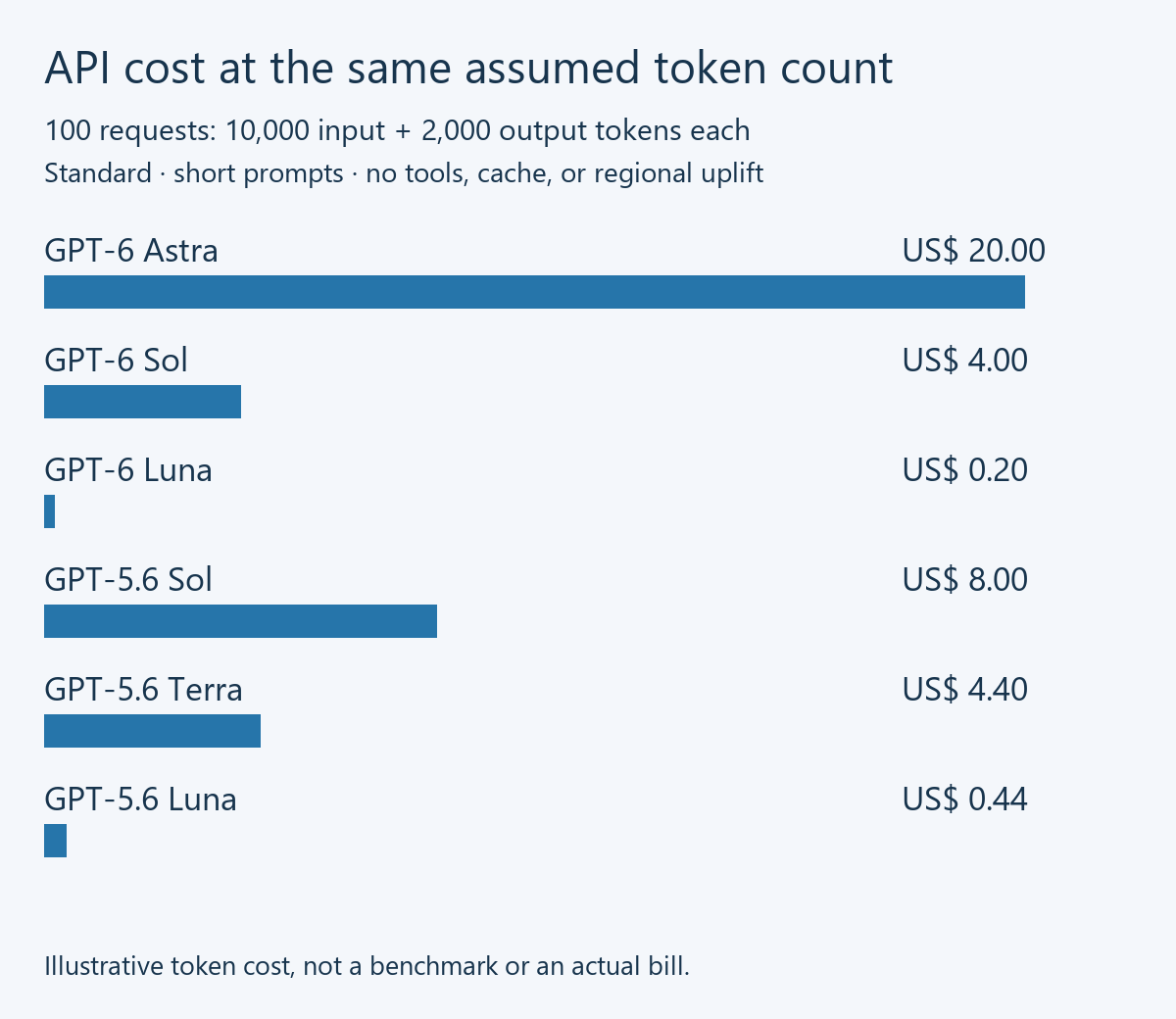
The example holds token counts constant; it is not a quality benchmark or an actual bill. More reasoning, tool use, or retries can change consumption. Official reasoning documentation explains that invisible reasoning tokens are billed as output tokens. They are included within the response’s usage.output_tokens; adding the reasoning detail to that total again would double-count them.
Long prompts change the applicable rates. Each of these six model pages states that prompts exceeding 272,000 input tokens use double the input rate and 1.5 times the output rate for the full request. For GPT-6 Sol, a hypothetical single request with 300,000 input and 2,000 output tokens therefore costs 0.3 × US$4 + 0.002 × US$15 = US$1.23, before caching or tools, rather than US$0.62 at the short-prompt rates.
Caching reads and writes, Batch, Flex, Fast, regional processing, tools, and retries can also change the total. GPT-5.6 Sol’s promotional pricing is documented as available at least through November 21, 2026, so do not assume it is permanent. Select the applicable processing tier in the official pricing page when budgeting.
Which model should you test for your use case?
| Situation | First model to test | Reason |
|---|---|---|
| Hard research, design, or long-running agent work | GPT-6 Astra | Targets ambiguous, multi-tool work |
| Professional writing, coding, and everyday automation with cost constraints | GPT-6 Sol | Balances capability and listed token cost |
| Large-scale extraction, classification, or simple transformations | GPT-6 Luna | Lowest listed Standard token prices here |
| Maintaining a GPT-5.6 flagship workflow | GPT-5.6 Sol | Preserves an established evaluation baseline |
| Maintaining a middle tier within GPT-5.6 | GPT-5.6 Terra | Balanced option in the 5.6 family |
| Maintaining low-cost, high-volume GPT-5.6 processing | GPT-5.6 Luna | Keeps existing 5.6 behavior in the comparison |
These are candidates for evaluation, not measured performance rankings. The best choice depends on your actual inputs, acceptance criteria, latency target, and full cost per completed task.
A practical way to compare the models
Published specifications explain each model's intended role, but a single generic benchmark cannot select a model for every production workflow. Use a small, representative evaluation set:
- Collect representative tasks. Include normal cases, missing information, conflicting constraints, long inputs, and known failures. Define required facts or acceptance checks before seeing the model’s answer.
- Control the other conditions. Use the same instructions, sources, tools, and output format. Begin at a shared supported effort, then test lighter settings individually. Do not force a model to use a value it does not support.
- Record quality and complete cost. Check correctness, omissions, format, and tool success alongside latency, every request’s token use, retries, and reviewer correction time. Limit permissions when an evaluation can access consequential systems or data.
- Use task-specific pass criteria. For extraction, check missing fields and unsupported values. For code changes, check the requirements and existing behavior. Longer or more fluent output is not itself a better result.
- Compare cost per accepted result. Cheap individual calls may lose their advantage after failures and review. A lighter model for ordinary cases, with escalation for uncertain or failed ones, is another configuration to evaluate.
- Keep changes reversible. Record the old model and prompt configuration and compare a limited set of tasks before switching. Restore the prior setup if regressions increase. Recheck representative cases when aliases, prices, or tool behavior change.
This process describes an evaluation to run in your environment. A stronger model or higher effort cannot make outdated or unsupported source material reliable. For research and writing, keep fact-checking AI information alongside model selection.