What Is GPT-6.1 Sol? Features, API Pricing, and Differences from GPT-6 Sol
GPT-6.1 Sol is an OpenAI language model designed to balance capability and cost for complex coding, computer use, and professional work. OpenAI describes it as delivering near-Astra performance at a lower price, but this does not mean it matches Astra on every task. The practical question is whether it can meet your quality requirements with acceptable revision time and total cost.
Choose a model by the work it needs to do, not simply by its name. Classifying thousands of short entries and preparing a publishable article from several sources involve different requirements for accuracy, reasoning, and review.
Source: OpenAI’s GPT-6.1 Sol model documentation.
What is GPT-6.1 Sol useful for?
GPT-6.1 Sol is intended for work that requires understanding context and producing a useful deliverable, rather than merely generating fluent text. OpenAI’s model selection guidance includes examples such as preparing a board presentation from financial results or building a website from a product brief.
The following are potential applications, not results from our own benchmark or a claim that this model always outperforms alternatives:
- Coding: interpret requirements, examine existing code, propose changes, and prepare tests. Proposed fixes still need to be executed and verified in the relevant environment.
- Document analysis: identify common findings and differences across files, then produce a report or comparison. Specify which sources are allowed and prohibit unsupported additions.
- Multi-step tool use: search for information, inspect files, and produce an output across several steps. This is often called an agentic workflow: the model works through a task using tools. The tools and permissions supplied by the application determine which actions are actually possible.
For bloggers, these capabilities may help organize comparison criteria or synthesize official documentation. However, a polished paragraph is not evidence that its claims are accurate. Source checks and editorial judgment remain necessary.
Source: OpenAI’s model selection guide.
Inputs, outputs, and key specifications
An application programming interface (API) lets software call a model directly. The specifications below describe the API model, not the subscription features or usage limits of every application that might offer it.
| Item | GPT-6.1 Sol | What it means |
|---|---|---|
| Model ID | gpt-6.1-sol | The identifier used in API requests. |
| Input | Text and images | Requests can include written instructions and supported image inputs. |
| Output | Text | Image generation through tools is separate from the model’s direct output modality. |
| Context window | 1,050,000 tokens | The maximum context available to a request, including its relevant inputs and outputs. |
| Maximum input | 922,000 tokens | The input cap is separate from the full context window. |
| Maximum output | 128,000 tokens | Includes generated reasoning; actual output depends on request settings and available context. |
| Knowledge cutoff | April 30, 2026 | More recent facts require current sources or retrieval tools. |
| Direct audio and video support | Not supported | A pipeline that transcribes audio or extracts video frames is not the same as native audio or video input. |
Tokens are the units used to process and bill model input and output. They are not a fixed number of words or characters: token usage varies with language and content. Consequently, a context window should not be converted into a guaranteed number of pages.
A large context window also does not guarantee perfect retrieval of every detail. Remove irrelevant files, distinguish the material to analyze from supporting references, and ask the model to identify where important evidence appears. Long inputs can affect both cost and the difficulty of checking the answer.
Source: GPT-6.1 Sol specifications.
API pricing and example calculations
Input, cached input, cache writes, and output have separate prices. Do not assume that repeating a prompt makes all of its input eligible for the cached-input rate. Check the applicable caching behavior and actual usage records.
| Billing category | Standard price per 1 million tokens, USD |
|---|---|
| Input | $2.00 |
| Cached input | $0.10 |
| Cache write: default 30 minutes | $2.50 |
| Cache write: 12 hours | $5.00 |
| Output | $10.00 |
A cache read reuses saved input; a cache write stores input for potential reuse. The official caching guide specifies a GPT-6.1 Sol read rate of 5% of ordinary input, a default 30-minute write rate of 1.25 times ordinary input, and an optional 12-hour write rate of 2.5 times ordinary input. A prefix that is written but never reused can cost more, so evaluate whether the context actually repeats.
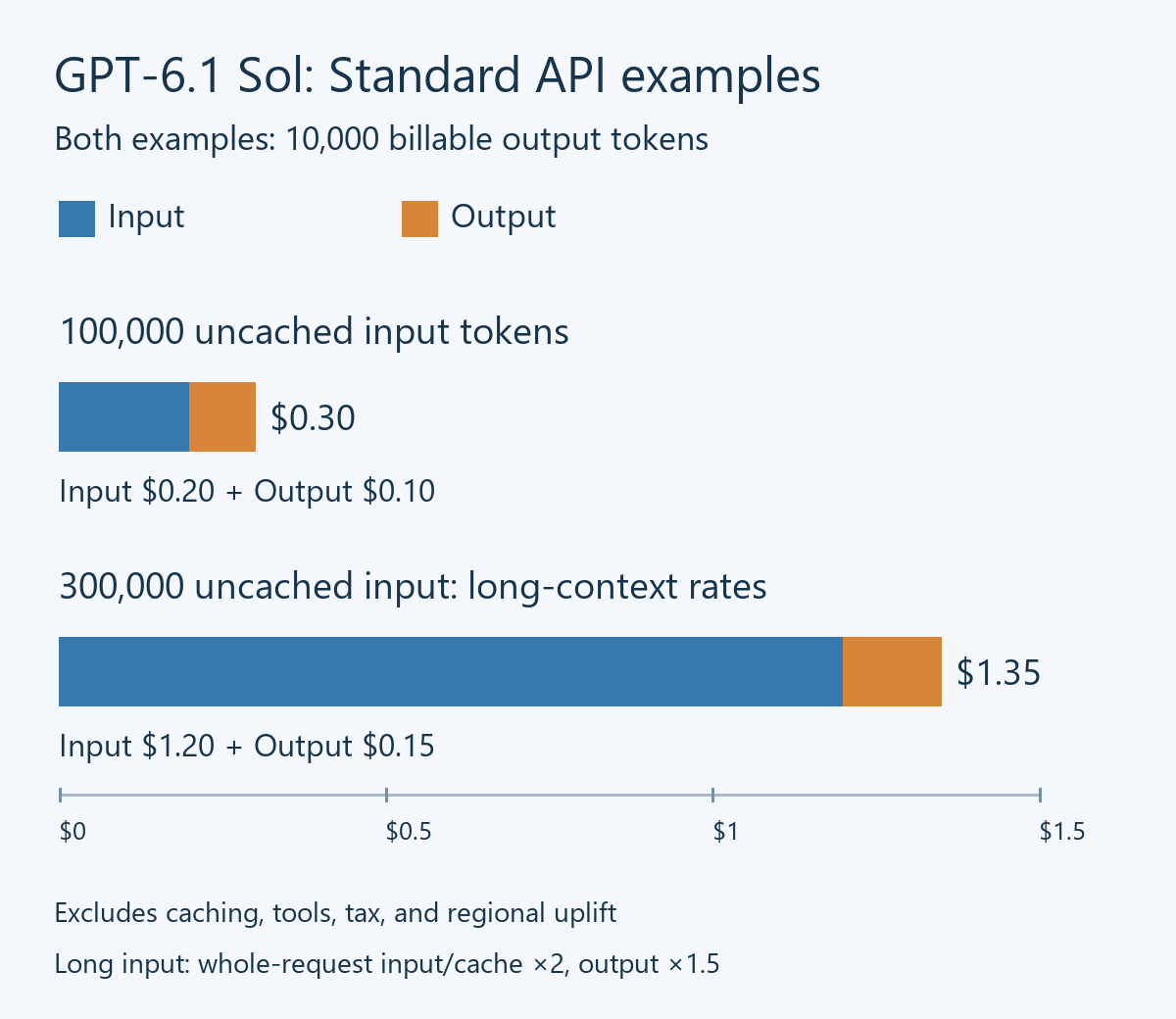
For a standard request with 100,000 ordinary input tokens and 10,000 billable output tokens, the calculation is $0.20 for input plus $0.10 for output, or $0.30 in total. This example excludes caching charges, tool charges, taxes, and processing or regional premiums. It is not a fixed cost per article.
Reasoning tokens are billed as output. In Responses API usage, output_tokens already includes reasoning, while output_tokens_details.reasoning_tokens reports the reasoning portion. Adding that portion again would double-count it. Use the reported usage rather than visible answer length. A max_output_tokens limit that is too small can produce an incomplete response before the visible answer finishes, so check completion status as well as cost. Retries, searches, revisions, and human review also matter when comparing the total cost of completing a task.
Sources: OpenAI API pricing and OpenAI’s reasoning guide.
Input accounting also requires separating ordinary input, cache reads, 30-minute writes, and 12-hour writes. Charging all of usage.input_tokens as ordinary input and adding cache charges would double-count tokens. The official usage fields identify cached_tokens, cache_write_tokens, and the write breakdown by lifetime; ordinary input is the remainder after reads and writes are removed from total input.
Long-input pricing applies to the entire request
When input exceeds 272,000 tokens, input and cache rates become twice the standard rates, while output becomes 1.5 times the standard rate. These multipliers apply to the entire request, not just the tokens above the threshold.
For example, 300,000 ordinary input tokens cost $1.20 at the adjusted $4-per-million rate. Another 10,000 billable output tokens cost $0.15 at $15 per million, giving a total of $1.35, before other applicable charges.
The chart compares the 100,000-input example with the 300,000-input example. Both have 10,000 billable output tokens, but the input quantities and applicable rates differ. It is an arithmetic illustration, not a performance test or an actual invoice.
Splitting documents may reduce the amount of context in one request, but it can also hide relationships between documents or introduce repeated inputs and summary-generation costs. Decide how to organize the material based on the context needed for a reliable answer, rather than the threshold alone.
Processing modes and application subscriptions are different
Fast costs twice the Standard rate, Ultrafast costs six times Standard, and Batch and Flex offer rates 50% below Standard, subject to availability and operating conditions. These are price multipliers, not guaranteed speed multipliers. Consider latency and scheduling: work that needs an immediate response is different from an asynchronous job that can finish later.
The October 2026 model documentation says GPT-6.1 Sol supports US and EU data residency, including Fast and Ultrafast. Regional processing carries a 10% premium where available. Check the supported combination of region, processing mode, and account settings; do not apply another model’s residency limitations to this one.
API token prices are not the same as ChatGPT or Codex subscription prices. Available models, tools, and usage limits in an application depend on the account and plan, so API pricing should not be used to infer a subscription’s allowance.
Source: GPT-6.1 Sol pricing, processing modes, and residency details.
How does it compare with GPT-6 Sol, Astra, and Luna?
Similar names do not imply identical capabilities, settings, or prices. The table below compares positioning and standard API rates; it is not a performance benchmark.
| Model | General positioning | Input | Cached input | Output |
|---|---|---|---|---|
| GPT-6.1 Sol | Capability–cost balance for complex work | $2.00 | $0.10 | $10.00 |
| GPT-6 Sol | Complex coding and agentic work | $2.00 | $0.20 | $10.00 |
| GPT-6 Astra | The most demanding work | $10.00 | $1.00 | $50.00 |
| GPT-6 Luna | Focused, high-volume tasks | $0.10 | $0.01 | $0.50 |
Prices are in USD per 1 million tokens at Standard rates, excluding long-input multipliers, tools, and other applicable adjustments. A lower token price does not always mean a lower completed-task cost: models may use different numbers of tokens or require different amounts of retrying and correction.
GPT-6.1 Sol’s cached-input price is half that of GPT-6 Sol in this comparison. That does not make the entire bill half as large. The benefit depends on how much input receives the cached rate and how much of the bill comes from output and other charges.
Sources: OpenAI’s model comparison and GPT-6 Sol documentation.
For a broader comparison that includes the GPT-5.6 family, see GPT-6 vs. GPT-5.6: Six Models Compared by Use Case and API Cost. Use its selection criteria alongside the latest official specifications and prices.
Reasoning settings and API compatibility need attention
Reasoning effort controls how much effort the model is asked to devote to working through a problem. GPT-6.1 Sol supports low, medium, high, xhigh, and max, with medium as the default. It does not support none or minimal.
GPT-6 Sol supports none, so an existing configuration should not be migrated by changing only the model name. Review reasoning settings and tool-calling compatibility as well. GPT-6.1 Sol supports tool calling through the Responses API; tool use is not supported through Chat Completions.
Source: OpenAI’s latest-model guide.
Start with the default setting on representative tasks, then adjust if the results justify it. Compare answer quality, revision needs, latency, and billable usage with the same inputs. Changing both the model and reasoning setting at once makes it harder to identify the cause of a difference.
What should you check when migrating from GPT-6 Sol?
Save a working request configuration and representative successful cases before changing the model. This gives you a rollback point. The following is a review process, rather than a claim that a migration was tested for this article.
- Match the model and settings. Before setting
modeltogpt-6.1-sol, check that the existing reasoning effort is supported. The official migration guide recommends starting withlowwhen migrating an unsupportednoneorminimalsetting, then evaluating representative tasks. - Check the endpoint and tools. Use Responses when tools are required. Distinguish requests with and without tools, and verify both a completed response and the continuation after tool results.
- Remove unsupported parameters. With reasoning enabled, which this model requires, review
temperature,top_p, andtop_logprobsagainst the migration guide. Also checklogprobsin Chat Completions andmessage.output_text.logprobsinside Responsesinclude. - Compare completion and usage. With the same material, record accuracy, output format, tool behavior, completion status, and input, cache, and output usage. If the new setup fails, restore the saved configuration and isolate the change before trying again.
For article work, provide the same official documents and question, then compare claims, numbers, and conditions using a consistent fact-checking process. Changing one variable at a time makes it easier to identify whether a difference comes from the model, prompt, reasoning effort, or tools.
Who should consider GPT-6.1 Sol?
The following suggestions are starting points for evaluation, not fixed rules or findings from our own testing.
| Situation | Candidate and rationale | What to check |
|---|---|---|
| Complex articles, document analysis, or coding where cost matters | Evaluate GPT-6.1 Sol for a balance of capability and price. | Quality, revision needs, and total completion cost. |
| Simple classification or extraction at high volume | Evaluate Luna before paying for a more capable model. | Exceptions and difficult inputs, not only easy examples. |
| Conflicting evidence or costly failures | Compare Astra with GPT-6.1 Sol on the actual work. | Grounding, error severity, and any necessary professional review. |
| An existing GPT-6 Sol workflow already works reliably | Evaluate GPT-6.1 Sol before migrating. | Compatibility, output formats, and regressions on previously successful tasks. |
Source: OpenAI’s model selection guide.
For a blogging workflow, give the candidates the same outline and source material. Check whether each draft answers the promised question, contains factual errors or unsupported claims, and needs substantial editing. Length and a confident tone are poor substitutes for this review.
Limitations and a practical evaluation checklist
GPT-6.1 Sol does not replace verification. For current information, check original sources and confirm numbers and links. Where an error could cause serious harm, such as legal, financial, or health advice, appropriate expert review remains important.
Tool permissions also deserve separate attention. Publishing content, deleting files, making payments, and sending messages can have consequences that are difficult to reverse. Use approval requirements, logs, and clear stopping conditions. A more capable model does not automatically justify broader permissions.
- Prepare representative examples. Include both easy and difficult cases, and remove sensitive information that is not required.
- Define acceptance criteria. Specify accuracy, output format, evidence requirements, and acceptable turnaround time before comparing results.
- Keep the comparison controlled. Use the same inputs and tools, and record errors and retries rather than judging only the final answer.
- Compare the cost of acceptable results. Among candidates that meet your criteria, consider total API usage and human correction time.
- Check for regressions. Rerun previously successful cases after changing the model or its settings.
GPT-6.1 Sol is worth evaluating when complex work needs strong capability without Astra’s standard token price. Simpler tasks may suit a lighter model, while especially difficult work warrants a direct comparison. The useful decision is the one supported by your own results for quality, time, and total cost.